
🦷 SmileCare – Dental Healthcare Mobile App
Give Your Dental Care Business a Professional Digital Experience!
Imagine your dental clinic, dental care services, appointment system, treatment information, and patient communication being brought together into one modern, simple, and patient-friendly mobile application.
SmileCare is designed as a dedicated dental healthcare mobile app that helps patients discover dental services, book appointments, manage upcoming visits, review treatment history, receive reminders, access health information, and stay connected with their dentist.
A professional dental app can help:
- Build Patient Trust & Professional Credibility
- Make Appointment Booking Easier
- Showcase Dentists & Their Specializations
- Organize Patient Appointments
- Maintain Treatment & Visit History
- Provide Important Dental Health Updates
- Improve Dentist–Patient Communication
- Keep Patients Connected With the Clinic
- Present Dental Services in a Modern Way
- Create a Better Overall Patient Experience
The goal of SmileCare is to make dental care feel simple, organized, approachable, and convenient for every patient.
SmileCare – Modern Dental Care Mobile App
Healthy Smiles. Happier Lives.
SmileCare is a modern dental healthcare application concept designed around the complete patient journey—from discovering dental services and selecting a dentist to booking appointments, managing visits, reviewing treatment history, and communicating with dental professionals.
The interface uses a clean and welcoming visual approach so that patients can easily understand and navigate important healthcare information without unnecessary complexity.
The app can showcase:
- Dental Consultations
- Teeth Cleaning
- Cavity Filling
- Root Canal Consultation
- Dental Braces
- Cosmetic Dentistry
- Oral Health Care
- Dentist Profiles
- Appointment Booking
- Appointment Management
- Treatment History
- Patient Medical History
- Notifications & Reminders
- Dentist–Patient Messaging
- Payment Methods
- Patient Profile
- Dental Reports & Updates
- Personalized Dental Care
Case Study – SmileCare
Project Overview
SmileCare is a dental care mobile application concept created to provide patients with a centralized platform for managing their dental appointments and healthcare information.
Instead of requiring patients to depend entirely on phone calls or manual appointment coordination, the application provides an organized digital experience where they can access essential dental services and information from their mobile device.
Industry: Dental Healthcare / Dental Clinic / Patient Care
Application Type: Patient-Focused Dental Healthcare Mobile Application
Primary Purpose: To simplify dental appointment management and improve communication between patients and dental professionals.
Target Users
- Dental Clinic Patients
- Families
- Individuals Seeking Dental Care
- Existing Dental Patients
- Patients Managing Multiple Appointments
- Patients Requiring Follow-Up Treatments
Project Requirement
The objective behind SmileCare is to create a mobile experience that makes dental care easier to access and manage.
A patient should be able to open the application and quickly understand:
- Their upcoming appointment
- Available dental services
- Dentist information
- Appointment date and time
- Treatment history
- Previous visits
- Notifications
- Dental records
- Profile information
- Communication options
The application therefore focuses on clarity, convenience, trust, and patient engagement.
The SmileCare Solution
SmileCare brings important dental-care activities into a single application.
The overall experience is structured around a simple patient journey:
Discover → Select Dentist → Choose Appointment → Confirm Visit → Attend Treatment → Track History → Stay Connected
The application interface is designed to keep frequently used functions easily accessible while presenting healthcare information in a clean and organized manner.
1. Welcome / Splash Screen
The opening screen establishes the SmileCare brand and communicates the purpose of the application.
- SmileCare logo
- Dental healthcare visual
- Brand tagline
- Short introduction
- Get Started button
- Sign In option
- Friendly dental imagery
Sample Branding: SmileCare — Caring Smiles, Healthier Lives.
Introductory Message: Expert Dental Care For A Brighter, Healthier You.
2. Patient Onboarding
The onboarding experience introduces patients to the main benefits of the application before they begin using it.
- Personalized Dental Care — Access dental services and information designed around your needs.
- Expert Dentists — Discover experienced dental professionals and their areas of specialization.
- Easy Booking — Select a preferred date and time and schedule your appointment conveniently.
- Safe & Hygienic Care — Understand the clinic’s focus on safe and professional dental treatment.
The onboarding screens help new users understand the application quickly without overwhelming them.
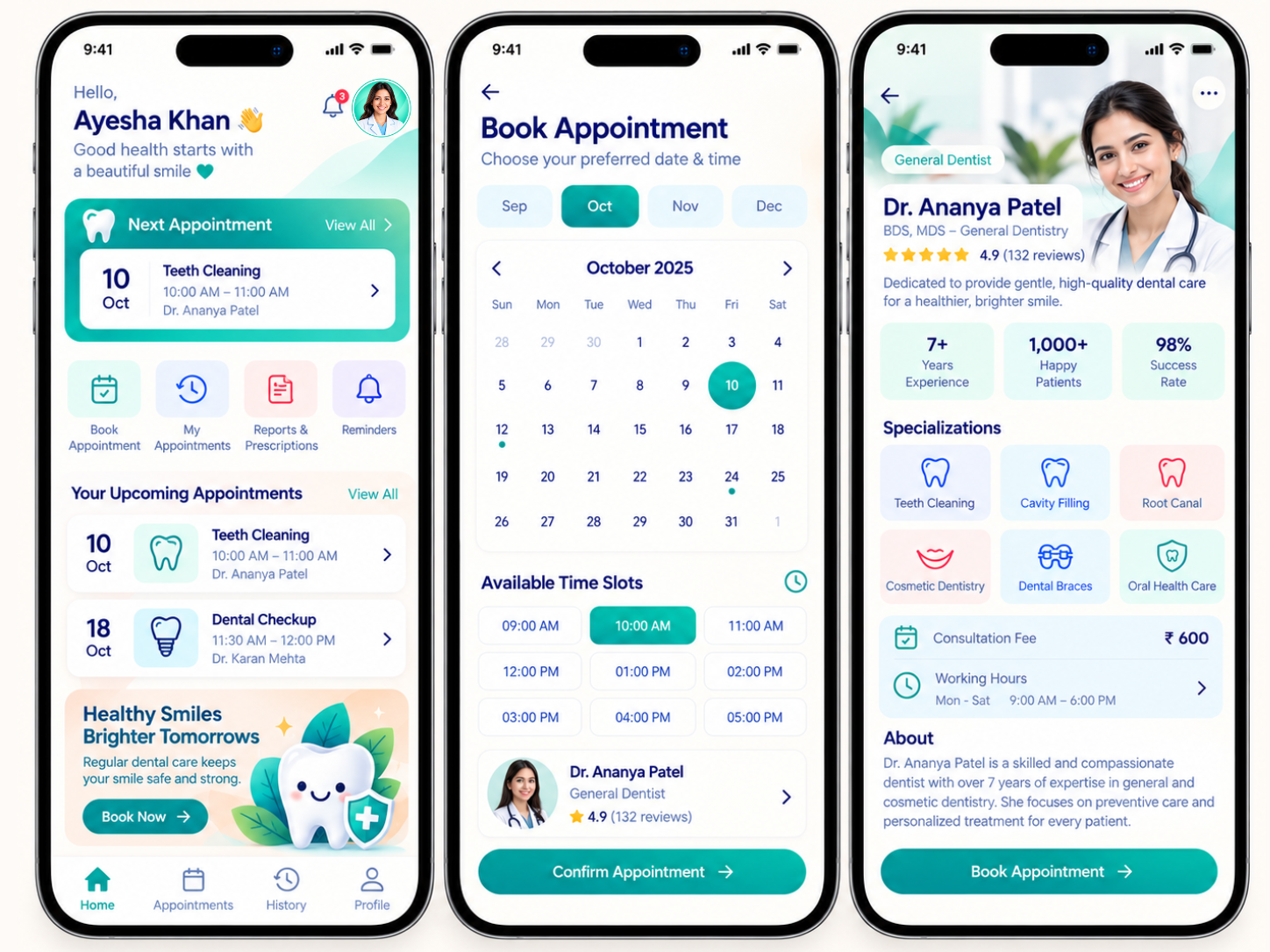
3. Patient Home Dashboard
The home dashboard acts as the patient’s central control panel.
- Patient greeting
- Profile picture
- Notifications
- Next appointment
- Appointment date
- Appointment time
- Dentist name
- Dental services
- Appointment shortcuts
- Treatment-related information
- Dental health promotional content
Quick Actions: Book Appointment, My Appointments, Reports / Prescriptions, Reminders.
4. Appointment Booking
Appointment booking is one of the core functions of SmileCare. Patients can select a convenient appointment based on available dates and time slots.
- Month selection
- Calendar
- Available dates
- Available time slots
- Dentist information
- Dentist profile
- Dentist specialization
- Patient appointment confirmation
Booking Flow: Select Month → Select Date → Select Time → Select Dentist → Confirm Appointment.
Example services: Teeth Cleaning, Dental Checkup, Cavity Filling, Root Canal Consultation, Orthodontic Consultation, Cosmetic Dentistry.
5. Dentist Discovery & Profiles
SmileCare provides detailed dentist profiles so patients can understand the professional they are booking with.
- Dentist photograph
- Name
- Professional designation
- Dental specialization
- Experience
- Patient reviews
- Rating
- Consultation fee
- Working hours
- Areas of expertise
- Available appointment slots
- About the dentist
Example specializations: General Dentistry, Teeth Cleaning, Cavity Filling, Root Canal Treatment, Cosmetic Dentistry, Dental Braces, Oral Health Care.
6. Dental Services
The application presents important dental services in a visually organized manner.
- General Consultation — Routine dental consultations and professional assessment.
- Teeth Cleaning — Regular cleaning appointments to support oral hygiene.
- Cavity Filling — Dental care for treating cavities and restoring affected teeth.
- Root Canal Consultation — Appointment management for patients requiring root canal evaluation or treatment.
- Dental Braces — Information and consultation support for orthodontic treatment.
- Cosmetic Dentistry — Services focused on improving the appearance and confidence of a patient’s smile.
- Oral Health Care — General preventive dental care and ongoing oral health management.
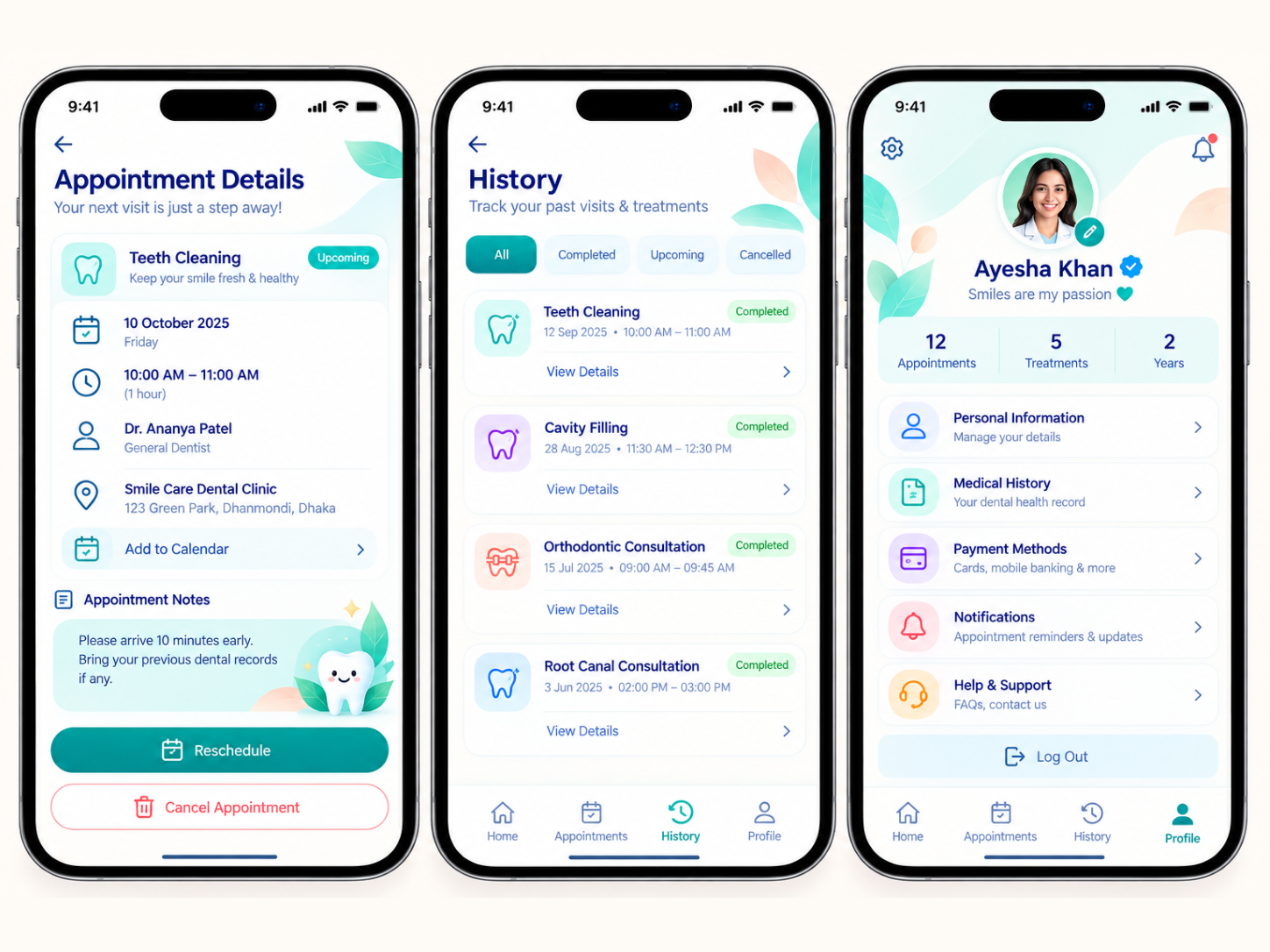
7. Appointment Details
Once an appointment has been booked, patients can access all important appointment information from one place.
- Appointment type
- Date
- Time
- Dentist
- Clinic
- Consultation type
- Appointment notes
- Appointment status
Patient actions: Reschedule Appointment, Cancel Appointment, Add to Calendar, Join Consultation, where applicable.
8. Treatment & Appointment History
The History section allows patients to review their previous dental visits and treatments.
- All
- Completed
- Upcoming
- Cancelled
- Treatment name
- Dentist
- Appointment date
- Appointment time
- Treatment status
- Visit details
Examples: Teeth Cleaning, Cavity Filling, Orthodontic Consultation, Root Canal Consultation, Dental Checkup.
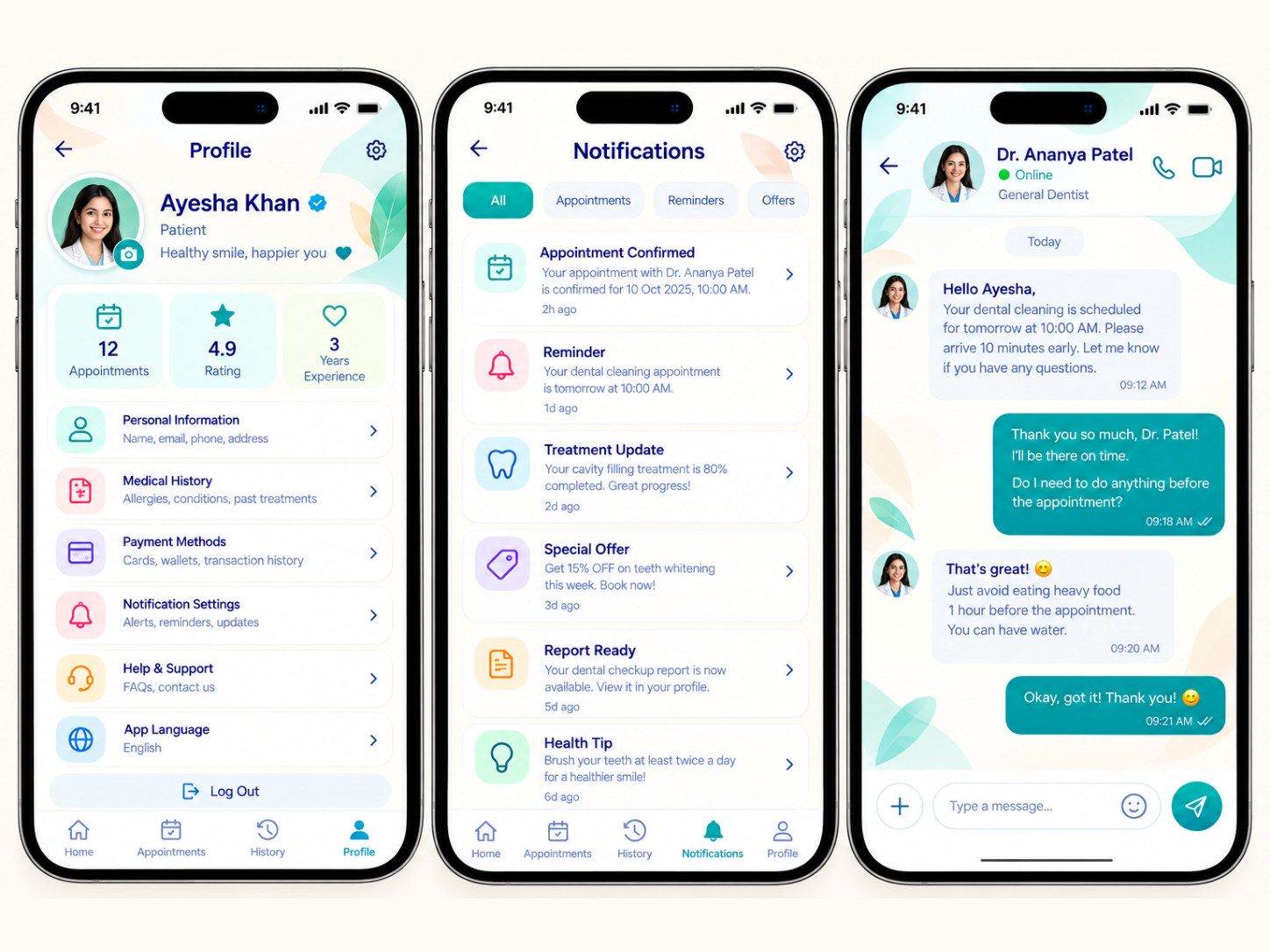
9. Notifications & Reminders
SmileCare includes a dedicated notification area for important patient updates.
- Appointment Confirmation
- Appointment Reminder
- Treatment Update
- Dental Report Ready
- Special Offers
- Dental Health Tips
- Clinic Updates
Example: Appointment Confirmed — Your appointment with Dr. Ananya Patel is confirmed.
Reminder: Your dental cleaning appointment is scheduled for tomorrow.
10. Dentist–Patient Messaging
The application provides a communication interface between the patient and dentist.
- Appointment questions
- Visit preparation
- Follow-up communication
- Treatment-related updates
- General appointment instructions
The conversation interface is designed to feel familiar and simple while maintaining the professional healthcare environment.
11. Patient Profile
The Profile section provides patients with centralized access to their account and dental information.
- Patient profile
- Personal information
- Medical history
- Dental history
- Appointment statistics
- Treatment information
- Payment methods
- Notification settings
- Help & Support
- App language
- Account settings
- Logout
The profile dashboard can also display summary information such as Total Appointments, Treatments, and Patient Rating / Experience Information.
12. Medical & Dental History
Patients can access relevant healthcare information through their profile.
- Previous treatments
- Dental visits
- Allergies
- Medical information
- Treatment records
- Dental reports
- Previous appointment information
This creates a more organized patient record experience.
13. Payment Methods
The application can provide a dedicated area for managing payment information.
- Credit / Debit Cards
- Digital Wallets
- Other supported payment methods
- Transaction History
This section keeps payment-related information organized and easily accessible.
14. Dental Reports & Updates
SmileCare can provide patients with access to relevant dental reports and treatment updates.
- Dental checkup reports
- Treatment reports
- Prescription information
- Follow-up recommendations
- Visit records
Patients can review their available information without having to search through different communication channels.
15. Personalized Dental Care
The application is designed around a more personalized patient experience.
- Upcoming appointment
- Current treatment
- Recent dental visit
- Reminder
- Recommended follow-up
- Dental health information
The objective is to make the app feel more useful during regular patient interactions.
16. UI/UX Design Direction
The SmileCare interface follows a modern healthcare design language.
- Clean layouts
- Soft backgrounds
- Rounded cards
- Clear typography
- Dental-themed illustrations
- Professional blue and teal color combination
- Friendly healthcare visuals
- Simple navigation
- Clear call-to-action buttons
- Consistent iconography
The design intentionally avoids making the application feel overly technical or complicated.
The objective is to create a balance between: Professional Healthcare + Friendly Patient Experience
17. Simple Navigation Structure
The application can use a straightforward bottom navigation system.
Main Navigation: Home | Appointments | History | Profile
Additional functionality such as notifications and messaging can be accessed through dedicated icons or relevant sections.
18. Complete Patient Journey
- Discover — Patient opens the SmileCare application.
- Get Started — Patient completes onboarding and enters the application.
- Explore — Patient reviews dental services and available dentists.
- Select Dentist — Patient views dentist profile, specialization, experience and availability.
- Book Appointment — Patient selects a date and available time.
- Confirm — Appointment details are displayed for confirmation.
- Appointment Reminder — Patient receives notifications before the scheduled visit.
- Attend Visit — Patient visits the dental clinic or uses the applicable consultation option.
- Track Treatment — Patient can review treatment history and relevant records.
- Stay Connected — Patient receives updates and can communicate with the dental team where supported.
19. Key Features of SmileCare
- Patient Dashboard — Centralized overview of patient activity
- Dentist Discovery — Search and explore dental professionals
- Dentist Profiles — Experience, specialization, rating and availability
- Appointment Booking — Select date and time for appointments
- Appointment Management — View, reschedule or cancel appointments
- Dental Services — Explore available dental treatments
- Appointment History — Review previous and upcoming visits
- Treatment History — Track completed dental treatments
- Notifications — Receive reminders and important updates
- Dentist Messaging — Communicate with the dental team
- Medical History — Maintain relevant patient information
- Reports — Access available dental reports
- Payment Methods — Manage supported payment options
- Patient Profile — Manage personal and account information
- Help & Support — Access assistance and FAQs
- Personalized Content — Relevant dental-care information and updates
20. Business Value for Dental Clinics
Better Appointment Management
Patients can view availability and manage appointments through a centralized interface.
Better Patient Communication
Important reminders and updates can be presented directly within the application.
Stronger Digital Presence
A branded mobile application creates a dedicated digital touchpoint for the dental clinic.
Better Patient Engagement
Patients can regularly interact with their appointments, treatment information, history and dental-care content.
Organized Patient Experience
Important information is grouped into clear sections instead of being scattered across different channels.
Professional Brand Presentation
A customized interface allows the clinic to present its services, dentists and patient-care approach consistently.
21. Who Can Benefit From an App Like SmileCare?
- Dental Clinics
- Multi-Dentist Clinics
- Dental Hospitals
- Cosmetic Dental Clinics
- Orthodontic Clinics
- Family Dental Practices
- Specialized Dental Centers
- Oral Healthcare Brands
- Dental Healthcare Startups
- Dental Chains
22. Why a Dental Mobile App Matters
Patients increasingly expect healthcare services to be convenient and accessible.
A dedicated dental application can bring together:
Appointments + Dentists + Treatments + History + Notifications + Communication
Instead of simply being an appointment-booking tool, SmileCare can become a digital patient-care platform that supports the patient’s relationship with the dental clinic.
23. Main Screens Covered in the UI/UX Concept
- Splash / Welcome Screen
- Patient Onboarding
- Home Dashboard
- Dental Services
- Dentist Discovery
- Dentist Profile
- Appointment Calendar
- Available Time Slots
- Appointment Details
- Appointment History
- Treatment History
- Patient Profile
- Medical History
- Payment Methods
- Notifications
- Dentist–Patient Chat
- Help & Support
- Account Settings
24. Project Scope
The SmileCare UI/UX concept demonstrates the structure and visual direction of a modern dental healthcare application.
Design Scope:
- User flow planning
- Mobile UI/UX design
- Patient journey design
- Dashboard design
- Appointment experience
- Dentist profile experience
- Treatment history interface
- Notification interface
- Profile interface
- Messaging interface
- Consistent visual design system
- Mobile-friendly layouts
Note: The screens shown represent a UI/UX design concept. Final development functionality, integrations, workflows, healthcare compliance requirements, and operational features would be defined separately according to the actual project requirements.
25. Future Expansion Possibilities
- Online consultation
- Family member profiles
- Digital prescriptions
- Treatment plans
- Dental report uploads
- Follow-up scheduling
- Automated reminders
- Insurance information
- Clinic locator
- Multiple clinic locations
- Patient feedback
- Loyalty programs
- Dental-care educational content
- Personalized care reminders
26. Branding
Brand Name: SmileCare
Tagline: Caring Smiles, Healthier Lives
Industry: Dental Healthcare / Patient Care
Application Type: Dental Healthcare & Appointment Management Mobile App
Primary Focus: Patient-Centered Dental Care
Core Services: Dental Consultation, Teeth Cleaning, Cavity Filling, Root Canal Care, Dental Braces, Cosmetic Dentistry, Oral Health Care
Target Users: Dental patients, families, clinics and dental healthcare providers.
27. Brand Experience
The SmileCare identity combines healthcare professionalism with a warm and approachable dental-care personality.
- Dental-inspired graphics
- Soft healthcare backgrounds
- Blue and teal accents
- Fresh green elements
- Friendly imagery
- Rounded UI components
- Clean typography
- Simple icons
Overall experience: Trust • Care • Simplicity • Comfort • Professionalism
28. Expected Project Benefits
- A smoother appointment experience
- Better patient engagement
- Easier access to dental information
- More organized patient records
- Improved communication
- Stronger clinic branding
- Better digital patient experience
- Convenient appointment management
- Improved visibility of dental services
- A more modern healthcare experience
Final Concept
SmileCare – Caring Smiles, Healthier Lives
SmileCare is designed around one simple idea: Dental care should be easier for patients to understand, manage, and access.
From the first app interaction to appointment booking, dentist discovery, treatment history, notifications, profile management, and dentist communication, every part of the experience is structured to make the patient’s journey smoother.
The concept transforms traditional dental-service interactions into a modern, organized, and patient-friendly digital experience.
Your Patients Deserve a Better Dental Experience
Planning a dental clinic app, patient-care platform, or healthcare product?
Let’s create a modern digital experience that makes appointment management, patient communication, and dental care easier.
Let’s Build Your Dental Care App Together.
SmileCare — Caring Smiles, Healthier Lives