🎓 Scholara – School Management Mobile App
Detailed Project Proposal, UI/UX Case Study & Feature Document
A modern school management mobile application concept designed to make everyday academic activities easier to manage, understand, and access. The concept brings classes, assignments, grades, attendance, schedules, notices, messages, academic information, and student profile management into one organized mobile experience.
🎓 Smart Education Starts With Better Design!
Imagine a school management application where students can check their classes, view assignments, follow their academic performance, manage their schedules, receive important notices, and stay connected with their school community from one simple mobile experience.
A well-designed education app should reduce complexity rather than add to it. The interface should help students find important information quickly, understand what needs attention, and keep track of their academic routine without navigating through confusing screens.
- Create a professional digital experience for schools and education organizations
- Give students one central place to manage academic activities
- Make assignments, classes, schedules, grades, and attendance easier to access
- Keep students informed through notices and messages
- Provide a clear view of academic progress and performance
- Make important student information available through a structured profile
- Improve communication between students and their educational environment
- Create a scalable foundation for future education-focused features
🌱 This School Management App Could Be Yours
Check out this premium mobile application concept designed around the daily needs of students and school management workflows. The interface combines a clean academic visual style with structured cards, clear navigation, subject-based organization, and easy-to-understand actions.
The application is designed around a simple journey: Sign in → Understand today’s academic activity → Access classes and assignments → Check schedules and performance → Receive updates → Manage the student profile.
The concept can be adapted for schools, educational institutions, EdTech businesses, coaching organizations, academic networks, and other education-focused platforms according to their actual requirements.
🌍 Case Study – Scholara
Scholara is presented as a modern school management mobile application created to simplify academic organization and student engagement. The following client profile is a case-study example prepared for presentation purposes.
Client: Ms. Neha Kapoor, Academic Coordinator
Requirement: A modern student-focused mobile application that could organize classes, assignments, academic performance, attendance, schedules, notices, messages, and profile information within a single easy-to-use interface.
🎯 The Challenge
The client wanted a mobile experience that could bring several everyday academic activities into one place without making the application feel complicated. Students need quick access to information such as today’s classes, assignment deadlines, academic results, attendance, and school communication.
- Create a simple and welcoming experience for students
- Organize multiple academic activities in a single application
- Make class information easy to browse and search
- Clearly communicate assignment deadlines and submission status
- Provide an accessible view of schedules and daily classes
- Present grades and academic performance in an understandable way
- Make attendance information easy to access
- Keep students updated through notices and messages
- Create a structured profile area for academic and personal information
💡 The Solution
The Scholara concept was structured around the student’s everyday academic journey. Instead of placing every feature into a complicated menu, the design uses a focused home dashboard, subject-based class cards, detailed assignment screens, a calendar-style schedule, and a dedicated profile area.
The result is a mobile experience where the most important information is visible at the right time, while deeper academic information remains accessible through clearly labeled sections.
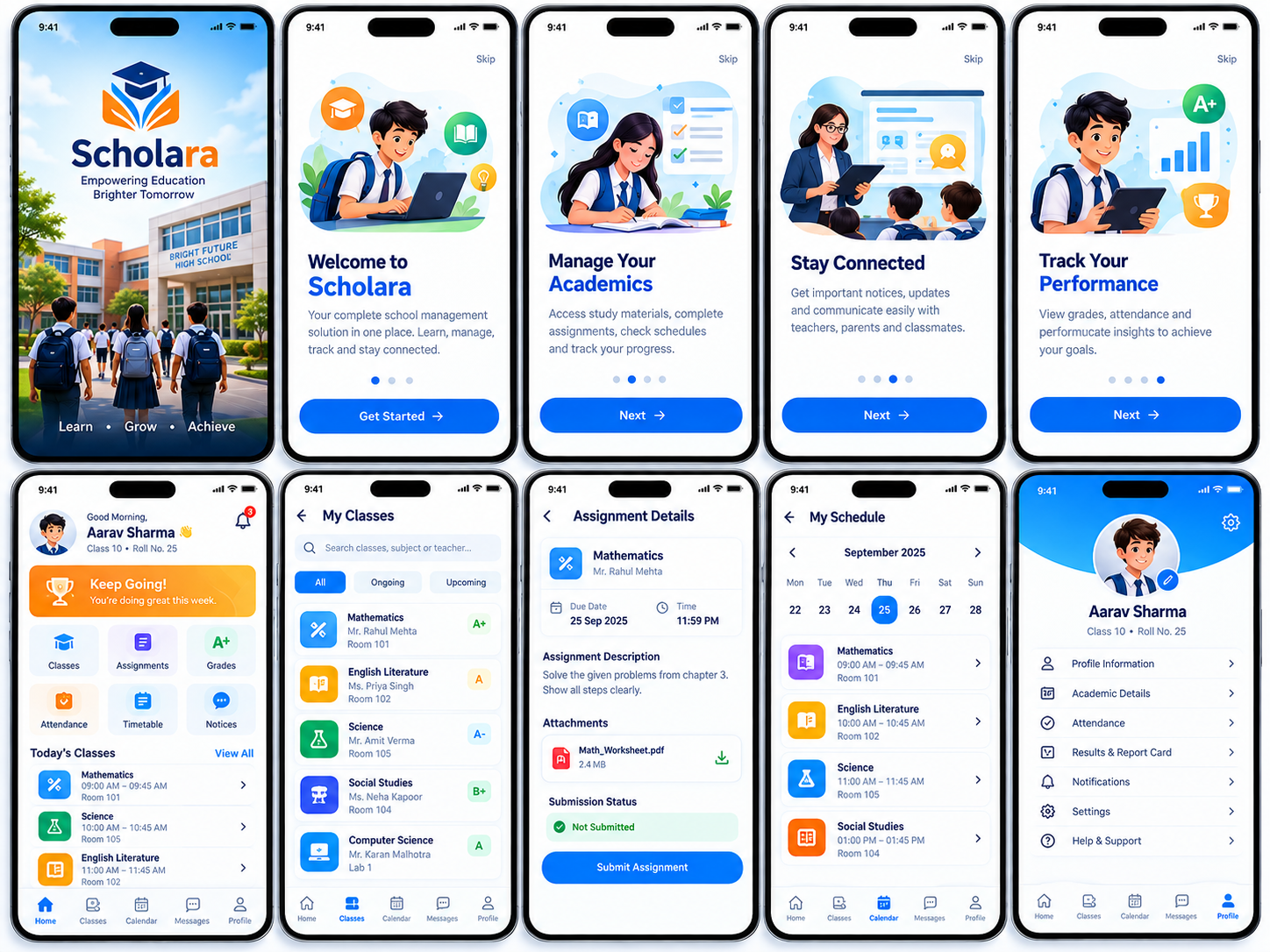
📱 Core App Screens & Functionality
1. Splash / Welcome Screen
Introduces the Scholara brand and establishes the purpose of the application before the student enters the main experience.
- Custom Scholara branding
- School-focused visual imagery
- Academic positioning
- Student-oriented messaging
- Get Started action
2. Onboarding
Explains the core purpose of the application and introduces students to a centralized school management experience.
- Welcome to Scholara
- Manage Academics
- Stay Connected
- Track Performance
- Next and Skip navigation
3. Home Dashboard
Acts as the student’s central academic hub, showing personalized information and quick access to frequently used functions.
- Student greeting
- Progress motivation card
- Classes
- Assignments
- Grades
- Attendance
- Schedule
- Notices
- Messages
- Today’s Classes
4. My Classes
Provides an organized list of subjects and class information so students can quickly find the course they need.
- Search classes
- Subject list
- Teacher name
- Room information
- Current academic grade
- Ongoing and Upcoming filters
5. Assignment Details
Shows the complete information required to understand and submit an academic assignment.
- Subject
- Teacher
- Due date
- Submission time
- Assignment description
- Attached file
- Submission status
- Submit Assignment
6. My Schedule
Provides a calendar-based view of classes so students can understand their academic timetable for a selected date.
- Month navigation
- Date selection
- Subject schedule
- Class timing
- Room information
- Daily planning
7. Profile
Provides access to student personal and academic information along with important account-related sections.
- Profile information
- Academic details
- Attendance
- Results and Report Card
- Notifications
- Settings
- Help & Support
8. Grades & Performance
Supports academic performance visibility through grade indicators and progress-oriented information.
- Subject grades
- Performance indicators
- Academic results
- Progress information
- Report card access
9. Notices & Messages
Keeps students connected with important academic and school communication.
- School notices
- Academic updates
- Teacher communication
- Messages
- Notification indicators
🔄 Complete Student Journey
Scholara is structured around the daily student journey so academic information can be accessed in a logical sequence.
- Start – Open the application and enter the Scholara experience.
- Understand – The home dashboard highlights current academic activity.
- Learn – Access classes and subject information.
- Complete – Review, download, and submit assignments.
- Plan – Use the schedule to understand upcoming classes and timings.
- Track – Review grades and attendance.
- Connect – Read notices and messages.
- Manage – Use the profile for academic details, results, notifications, settings, and support.
📚 Academic Management Experience
The academic management flow is designed to make routine school activities easier to organize. Students can move from their dashboard to specific subjects, assignments, schedules, and performance information without unnecessary steps.
- Centralized class information
- Subject-wise organization
- Teacher and classroom visibility
- Assignment deadline tracking
- Assignment attachment access
- Submission status
- Calendar-based scheduling
- Grades and results access
- Attendance visibility
📝 Assignment Management
Assignments are presented as actionable academic tasks. The assignment detail screen gives the student the information required to understand what has been assigned, when it is due, and whether it has been submitted.
- Assignment title and subject
- Teacher information
- Due date and time
- Detailed instructions
- Downloadable attachments
- Submission status
- Submit Assignment CTA
- Clear distinction between pending and completed work
📅 Schedule & Daily Planning
The schedule interface helps students understand their academic routine by connecting dates, subjects, timings, and classrooms in one calendar-based experience.
- Monthly calendar navigation
- Selected-day schedule
- Subject-wise class cards
- Class timing
- Room information
- Quick access from bottom navigation
📊 Performance & Academic Tracking
The concept gives students a clear way to monitor academic progress. Grades, attendance, and results remain accessible through dedicated areas.
- Subject-level grade indicators
- Academic result access
- Report card section
- Attendance information
- Progress-oriented dashboard elements
- Performance-focused onboarding
🔔 Notifications, Notices & Communication
A school management app is also a communication channel. Scholara includes space for notices, messages, and notification indicators so students can stay aware of important updates.
- School notices
- Academic updates
- Teacher messages
- Important reminders
- Notification indicators
- Centralized message access
👤 Student Profile & Account Management
The profile section provides a structured view of the student’s identity and academic information while giving access to account controls.
- Student name, class and roll number
- Profile information
- Academic details
- Attendance
- Results and report card
- Notifications
- Settings
- Help & Support
🎨 UI/UX Design Approach
The Scholara concept follows a clean, modern, student-friendly visual direction. The objective is to make an education management system feel approachable rather than administrative or complicated.
- Clean white interface with blue and green academic accents
- Friendly school and student illustrations
- Clear typography hierarchy
- Subject-specific colors and icons
- Rounded cards for easy information scanning
- Large, understandable action buttons
- Consistent bottom navigation
- Short and direct labels
- Visual status indicators for grades and submissions
- Simple onboarding with focused messages
- Structured layouts that prioritize important information
📈 Project Outcome
The Scholara concept demonstrates how a school management application can bring multiple academic workflows into one consistent mobile experience.
- Creates a professional digital experience for a school or education brand
- Makes academic information easier to access
- Organizes classes and subjects clearly
- Simplifies assignment management
- Provides a structured academic schedule
- Makes grades and attendance easier to review
- Improves access to school communication
- Creates a central student profile
- Provides a foundation for future education services
🎯 Who Can Benefit From an App Like Scholara?
- Schools and School Groups
- Educational Institutions
- EdTech Startups
- Academic Networks
- Coaching and Learning Centers
- Private Schools
- International Schools
- Student Management Platforms
- Education Service Providers
- Academic Administration Platforms
🚀 Why Choose SiteSwift?
At SiteSwift, we focus on creating digital products around real user journeys. An education application has to serve students, teachers, parents, and administrators without making the experience difficult to understand.
For a student-facing application, the interface needs to communicate academic information clearly while keeping everyday actions quick and accessible.
- Business-focused product planning
- Modern and professional UI/UX design
- Student-focused user journey planning
- Clear information architecture
- Mobile-first experience design
- Academic workflow organization
- Professional visual branding
- Scalable screen and feature structure
- Usability-focused interface design
- Design refinement based on project requirements
From initial product planning and user-flow design to the final mobile experience, SiteSwift can help transform an education app idea into a professional digital product tailored to the institution’s requirements.
🔮 Potential Future Features
The current UI/UX concept can be expanded depending on the final school or education platform requirements.
- Parent dashboard
- Teacher dashboard
- Administrator dashboard
- Online classes
- Digital study materials
- Exam and test management
- Online fee payment
- Fee receipts and history
- Homework reminders
- Attendance alerts
- Result publishing
- Report card downloads
- School calendar
- Events and announcements
- Teacher-parent communication
- Student progress reports
- Library management
- Transport information
- Leave requests
- Certificates and documents
💙 Ready to Build Your Education App?
Education technology should make learning and academic management feel simpler, clearer, and more connected. Whether you are a school, education group, EdTech startup, coaching organization, or academic platform, SiteSwift can help you create a professional mobile experience around your real users and workflows.
We can design a modern, intuitive, and student-friendly education application tailored to your brand, academic structure, communication requirements, and management processes.
Let’s create a digital education experience that helps students learn, manage, track, and stay connected with confidence.
📌 Project Information
Project Name: Scholara
Project Type: School Management Mobile Application
Primary Purpose: Help students manage academic activities and stay connected with their school
Primary Users: Students
Supporting User Groups: Schools, teachers, parents, academic coordinators, and administrators depending on final scope
Core Areas: Classes, assignments, grades, attendance, schedule, notices, messages, academic details, profile and support
Design Direction: Clean, modern, friendly, academic and student-focused
Reference: Provided School Management UI/UX concept
⚠️ UI/UX Concept for Reference
This project is presented as a UI/UX design concept based on the provided School Management mobile application reference. The screens demonstrate the intended visual direction, onboarding experience, student dashboard, classes, assignments, schedule, academic tracking, profile, notices, and communication structure. Final product functionality, user roles, business rules, integrations, and production requirements would be finalized during project planning.
📣 Final Project Summary
Scholara demonstrates a complete student-focused school management experience. From onboarding and the home dashboard to classes, assignments, schedules, grades, attendance, notices, messages, and profile management, the concept is designed to keep academic information organized and easy to access.
For schools and education businesses, a thoughtfully designed mobile application can become an important digital channel for students and their academic communities. A clear interface reduces friction in everyday tasks and makes important information easier to find.
SiteSwift can help transform this type of UI/UX concept into a professional, brand-focused education product tailored to the institution’s workflows, audience, and future growth plans.