Pure Veg Delights – Restaurant Ordering App
Project Type: A Dedicated Digital Ordering Experience for a Single Restaurant
Industry: Restaurant & Food Delivery
Business Model: Direct-to-Customer Restaurant Ordering
Platform: Mobile Application
🌿 Turn Your Restaurant Into a Powerful Digital Brand
Imagine your restaurant having its own professionally designed mobile ordering application where customers can explore your menu, discover regional vegetarian dishes, view food details, select portion sizes, add special instructions, manage their cart, choose a delivery address, make a secure payment, and track their order until it reaches their doorstep.
This concept is designed specifically for a single restaurant rather than a marketplace containing multiple restaurants. The entire digital experience is centered around one restaurant brand, allowing the business to control its menu, offers, customer relationship, ordering process, and brand identity from one dedicated platform.
A dedicated restaurant application can provide a more direct relationship between the restaurant and its customers. Instead of sending customers through a generic marketplace experience, the restaurant can present its own story, food philosophy, menu, offers, ordering process, and customer support experience under its own brand.
A Dedicated Restaurant App Can Help You:
- Build a stronger direct-to-customer digital presence.
- Present the complete restaurant menu in a branded environment.
- Showcase signature dishes, regional specialties, and recommended food.
- Make food ordering simple and convenient for returning customers.
- Promote restaurant-specific offers and coupons.
- Maintain customer profiles, saved addresses, and order history.
- Provide multiple payment methods for easier checkout.
- Provide real-time delivery tracking for active orders.
- Create a scalable foundation for loyalty, memberships, rewards, and repeat ordering.
At SiteSwift, we design and develop dedicated restaurant applications for restaurants, cafés, vegetarian food brands, cloud kitchens, QSRs, regional food businesses, and restaurant chains. The application can be designed around your exact menu, brand identity, service area, ordering model, and operational workflow.
🍃 A Digital Experience Built Around One Restaurant Brand
The reference design follows a brand-first approach. Instead of beginning with a list of restaurants, the application begins with the identity of the restaurant and its food philosophy: authentic vegetarian Indian food delivered conveniently to customers.
The visual direction combines natural green tones with warm orange accents. Green communicates freshness, vegetarian positioning, and natural ingredients, while orange highlights important actions such as ordering, adding food to the cart, and completing payment.
The application can be structured around the restaurant’s own categories and specialties, such as North Indian, South Indian, Gujarati, Rajasthani, Bengali, Maharashtrian, Street Food, Biryani & Rice, Unique Specials, Curries, Breads, and Desserts.
This makes the application feel like a complete digital extension of the restaurant rather than simply an ordering screen. Every major customer interaction remains connected to the restaurant’s own brand.
📖 Case Study – Pure Veg Delights
This project concept was developed for Pure Veg Delights, a dedicated vegetarian restaurant brand focused on serving authentic Indian vegetarian food through a convenient digital ordering experience.
Client Representative: Mr. Aarav Sharma
Restaurant Brand: Pure Veg Delights
The Business Requirement
The restaurant wanted a dedicated mobile ordering experience through which customers could discover its food, browse categories, view detailed dishes, place delivery orders, make payments, and track active orders without depending on a multi-restaurant marketplace.
The business also wanted the application to communicate its vegetarian positioning clearly and create a more recognizable digital identity around its food, service quality, and customer experience.
The Product Objective
The objective was to create a simple but premium restaurant ordering experience where the customer can complete the full journey in a few clear stages:
- Discover the restaurant and its vegetarian food offering.
- Browse food categories and recommended dishes.
- Open a dish to review its details and portion options.
- Add selected items to the cart.
- Select or add a delivery address.
- Choose a preferred payment method.
- Place the order securely.
- Follow preparation and delivery progress in real time.
- Receive the order and return to the app for future orders.
📱 Product Structure – What the App Includes
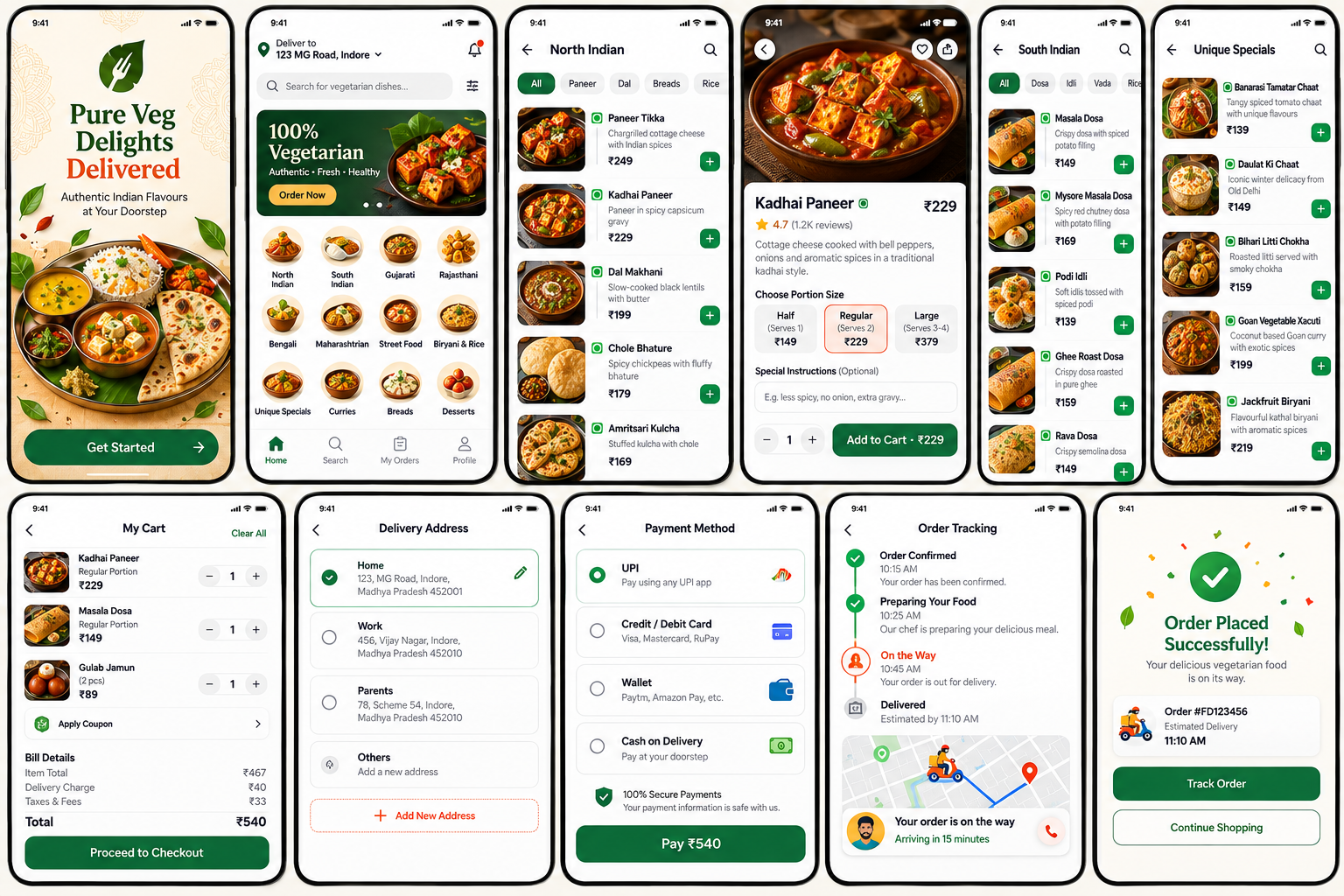
01. Branded Welcome Experience
The opening screen establishes the restaurant identity immediately. Food imagery, natural colors, vegetarian messaging, and a clear Get Started action introduce the customer to the digital experience.
- Restaurant branding
- Vegetarian positioning
- Food-focused visual identity
- Get Started CTA
02. Restaurant Home
The home screen acts as the restaurant’s digital storefront. Customers can see their delivery location, search for dishes, view promotional banners, browse categories, and discover recommended food.
- Delivery location
- Search
- Promotional banner
- Food categories
- Recommended sections
- Navigation
03. Cuisine & Category Browsing
The category experience allows the restaurant to organize its menu into clear food groups. Customers can move quickly between cuisines and categories instead of scrolling through one long menu.
- North Indian
- South Indian
- Gujarati
- Rajasthani
- Bengali
- Maharashtrian
- Street Food
- Biryani & Rice
- Unique Specials
- Curries
- Breads
- Desserts
04. Menu Listing
Each category can contain a structured list of dishes with food images, descriptions, prices, vegetarian indicators, and quick add-to-cart actions.
- Food image
- Dish name
- Short description
- Price
- Vegetarian indicator
- Quick add button
05. Food Detail
The food detail screen gives customers the information needed before ordering. It can include ratings, dish descriptions, portion sizes, special instructions, quantity controls, and the final add-to-cart price.
- Dish image
- Rating and reviews
- Description
- Half / Regular / Large options
- Special instructions
- Quantity
- Add to Cart
06. Cart
The cart provides a transparent summary of the customer’s selected dishes. It allows quantity changes and displays coupon options and the complete billing calculation.
- Selected dishes
- Quantity controls
- Coupon
- Item total
- Delivery charge
- Taxes & fees
- Final total
07. Delivery Address
Customers can save and select multiple delivery addresses such as Home, Work, Parents, or other locations. This reduces repeated data entry during future orders.
- Saved addresses
- Selected address
- Edit address
- Add New Address
08. Payment
The payment screen provides a clear and trustworthy way to complete the order. The concept supports UPI, cards, wallets, and Cash on Delivery.
- UPI
- Credit / Debit Card
- Wallet
- Cash on Delivery
- Secure payment message
- Pay button
09. Real-Time Order Tracking
Once an order is placed, customers can see the progress from confirmation and food preparation to delivery. A map and delivery partner information can provide additional visibility during the final delivery stage.
- Order confirmed
- Preparing food
- On the way
- Delivered
- Live map
- Delivery partner
- ETA
- Call action
10. Order Success
The confirmation screen reassures the customer that the order has been placed successfully and provides the order number, estimated delivery time, and a direct route to tracking.
- Success confirmation
- Order ID
- Estimated delivery
- Track Order
- Continue Shopping
11. Customer Profile
The profile section provides access to the customer’s orders, addresses, payment methods, favorites, coupons, support, and other account settings.
- My Orders
- Addresses
- Payment Methods
- Favorites
- Coupons
- Help & Support
- About App
- Logout
🔄 Customer Ordering Flow
The app is designed to make repeat ordering particularly simple. A customer can move through a familiar sequence while the restaurant retains complete ownership of the digital experience.
- Open the restaurant’s branded application.
- View the restaurant’s food proposition and featured offers.
- Confirm the delivery location.
- Search for a dish or browse food categories.
- Select a category and explore available dishes.
- Open a dish and select the required portion size.
- Add special instructions if required.
- Add the dish to the cart.
- Review the cart and apply a coupon if available.
- Select a saved delivery address.
- Choose UPI, card, wallet, or Cash on Delivery.
- Complete the payment and place the order.
- Receive order confirmation and status notifications.
- Track the order while the food is being prepared and delivered.
- Receive the food and return to the application for future ordering.
💼 Why a Dedicated Restaurant App Can Be Valuable
A single-restaurant application is fundamentally different from a multi-restaurant marketplace. The entire experience is designed around one brand, which gives the restaurant greater control over presentation, customer communication, promotions, and the ordering journey.
Direct Brand Experience
The restaurant controls the visual identity, food presentation, messaging, offers, and customer experience.
Stronger Customer Relationship
A dedicated application can provide a direct digital channel between the restaurant and its customers.
Restaurant-Specific Offers
Promotions, coupons, first-order incentives, repeat-order offers, and loyalty campaigns can be designed around the restaurant.
Simplified Repeat Ordering
Saved addresses, previous orders, favorites, and customer preferences can make future orders faster.
Better Menu Presentation
The restaurant can organize its own dishes, categories, specials, portions, and descriptions without competing with other brands on the same screen.
Delivery Visibility
Real-time tracking can give customers greater confidence once the order leaves the restaurant.
Scalable Customer Platform
The application can later support loyalty, memberships, subscriptions, rewards, referrals, and personalized promotions.
⚙️ Core Digital Features
📍 Location & Address Management
Customers can save multiple addresses and select the required delivery location during checkout.
🛒 Smart Cart
The cart keeps selected dishes, quantities, coupon benefits, delivery charges, taxes, and final order value organized.
💳 Secure Payment Options
The application can support UPI, cards, wallets, and Cash on Delivery through suitable payment integrations.
🔔 Customer Notifications
Customers can receive updates for order confirmation, food preparation, dispatch, delivery, offers, and other important events.
📦 Real-Time Order Tracking
Customers can view the progress of an active order and, where supported, see delivery movement on a map.
🎟️ Promo Codes & Offers
The restaurant can run discount campaigns, coupons, first-order offers, repeat-customer promotions, and seasonal campaigns.
⭐ Reviews & Ratings
Customers can provide feedback on food and service, helping the restaurant understand customer satisfaction.
❤️ Favorites
Customers can save preferred dishes for easier repeat ordering.
📋 Order History
Customers can review previous orders and use their order history as a convenient reference for repeat purchases.
🎨 Design Direction – Fresh, Premium & Restaurant-Centric
The visual design is intentionally different from a marketplace-style food application. The restaurant remains the hero throughout the experience. Food photography is prominent, menu categories are easy to scan, and the green-and-orange visual language reinforces freshness, vegetarian food, warmth, and appetite.
- Fresh green primary identity for vegetarian positioning
- Warm orange accents for important actions and promotions
- Large food photography
- Clean white content areas
- Simple rounded cards and controls
- Clear food category navigation
- Strong price and CTA visibility
- Minimal checkout complexity
- Trust-focused payment screen
- Clear order progress timeline
- Brand-led customer experience
🚀 Why Choose SiteSwift for Your Restaurant App?
SiteSwift approaches a restaurant application as a complete digital product rather than simply designing a collection of mobile screens. The goal is to create an experience that represents the restaurant professionally and supports real ordering and delivery operations.
Restaurant-Focused Product Strategy
We structure the application around your restaurant’s menu, customer journey, service area, ordering model, delivery process, and business objectives.
Custom UI/UX for Your Brand
The design can be created around your logo, colors, food photography, brand personality, menu categories, and customer expectations rather than using a generic template.
Smooth Ordering Experience
Search, category browsing, food selection, cart, address, payment, and tracking are designed as one connected flow.
Backend & Cloud Integration
The application can be connected with the required backend and cloud services according to the restaurant’s operational and business requirements.
Payment & Delivery Integration
The ordering experience can be connected with suitable payment and delivery services to support the restaurant’s checkout and fulfillment workflow.
Future Growth Support
The application can later expand with loyalty, rewards, memberships, subscriptions, referrals, personalized offers, and advanced customer analytics.
End-to-End Development Support
From planning and UI/UX to development, testing, deployment, and future improvements, SiteSwift can support the complete journey.
Your Restaurant Deserves More Than an Online Menu.
Brand → Discover → Order → Pay → Track → Deliver → Retain
🔮 Future Expansion Possibilities
The initial restaurant ordering application can become a broader digital ecosystem as the business grows.
- Restaurant Admin Dashboard
- Kitchen Order Management
- Delivery Partner App
- Order Acceptance and Preparation Workflow
- Live GPS Delivery Tracking
- Customer Loyalty Program
- Reward Points
- Referral Program
- Membership Plans
- Subscription Meal Plans
- Scheduled Orders
- Repeat Order
- Personalized Recommendations
- Birthday and Anniversary Offers
- Festival Campaigns
- Restaurant Wallet / Credits
- Customer Support Chat
- Order Cancellation and Refund Workflow
- Customer Feedback Dashboard
- Sales and Customer Analytics
- Inventory Integration
- POS Integration
- Multiple Branch Support
📈 Expected Business Outcome
The dedicated restaurant app concept creates a direct digital channel through which the restaurant can present its food, communicate with customers, accept orders, manage delivery interactions, and encourage repeat business.
- A stronger and more recognizable restaurant identity
- A dedicated mobile ordering channel
- Professional presentation of the complete menu
- Convenient ordering for customers
- Clear payment and billing experience
- Improved delivery visibility
- Direct promotion of restaurant offers
- Better repeat-order opportunities
- Foundation for customer loyalty and retention
- Scalable technology for future restaurant growth
- Administrative controls and reporting
- Restaurant-side order management
- Order history and customer support
- Coupons and promotional offers
- Customer notifications
- Order status and delivery tracking
- Payment processing integration
- Delivery address management
- Cart and checkout workflow
- Food item and portion management
- Restaurant menu and category management
- Customer registration and account management
The project can be developed as a complete digital ordering solution covering the customer-facing application, restaurant-side order handling, payment and checkout workflow, delivery coordination, notifications, and administrative requirements.
🔧 Development Scope
All integrations should be selected according to the restaurant’s actual business requirements, service area, operational process, security requirements, and preferred service providers. The exact implementation can therefore be finalized during the development stage rather than being restricted to a predefined technology stack.
The application is designed around the restaurant’s complete ordering and delivery workflow. The final implementation can be connected with the services and systems required by the restaurant, such as customer accounts, order management, payment processing, delivery operations, notifications, and location-based delivery tracking.
🧩 Product & Service Integration
The platform can be structured to support the required restaurant operations and connect the customer ordering experience with the services needed for order processing, payment, delivery, notifications, and customer management.
🍽️ Ready to Build Your Restaurant’s Own Ordering App?
Your restaurant should have a digital experience that feels as unique as the food you serve. A dedicated mobile application can bring your menu, brand, offers, ordering process, payments, and delivery experience together under one platform.
Whether you operate a vegetarian restaurant, family restaurant, café, QSR, cloud kitchen, regional food brand, or restaurant with multiple branches, SiteSwift can help create a modern, fast, secure, and customer-focused ordering application tailored to your business.
📩 Share your restaurant app requirements with SiteSwift and let’s build a direct digital ordering experience for your customers.
Discover Your Food → Choose Your Dish → Order Easily → Pay Securely → Track Delivery → Enjoy Your Meal
📌 Project Information
Project Title: Pure Veg Delights – Dedicated Restaurant Ordering App
Project Type: Single-Restaurant Food Ordering Mobile Application
Demo: Pure Veg Delights
Client Representative: Mr. Aarav Sharma
Industry: Restaurant & Food Delivery
Business Model: Direct-to-Customer Restaurant Ordering
Primary Purpose: Menu Discovery, Food Ordering, Secure Payment & Delivery Tracking
Core Modules: Welcome • Home • Categories • Menu • Food Details • Cart • Address • Payment • Tracking • Profile
Target Users: Restaurant Customers
Platform: Mobile Application
Design Approach: Fresh • Premium • Vegetarian • Brand-Centric • Mobile-First
Development Partner: SiteSwift
SiteSwift | Digital Product Design & Development