ConstructWay – Construction Project Management App
Project Type: Detailed Project Proposal, Case Study & Mobile App Concept
Industry: Construction & Project Management
Primary Purpose: Project Monitoring, Task Management, Material Control, Workforce Coordination, Documentation & Issue Reporting
Platform: Mobile Application
🏗️ Give Your Construction Business a Smarter Digital Project Management Experience!
Imagine having a professional mobile application through which construction teams can monitor projects, follow progress, manage tasks, coordinate workers, monitor materials, document site activities, and report issues from one centralized digital platform.
ConstructWay is a modern construction project management mobile app concept designed to bring important project information closer to project managers, engineers, supervisors, safety teams, quality teams, and other construction professionals working on active sites.
Construction projects involve multiple activities happening at the same time. Progress needs to be monitored, tasks need to be assigned and followed, materials need to be available when required, workers need to be coordinated, site documentation needs to be maintained, and problems need to be identified before they affect the project schedule. A structured mobile application can bring these activities into one organized workflow.
A Construction Project Management App Can Help Businesses:
- Monitor project progress from a centralized dashboard.
- Track multiple construction projects and their current status.
- Manage project tasks, deadlines, priorities, and completion status.
- Monitor construction materials and stock levels.
- Maintain site photos, videos, and project documentation.
- Coordinate workers, engineers, supervisors, and other project team members.
- Record construction issues, safety concerns, shortages, and site problems.
- Compare planned progress with actual project progress.
- Identify delayed, pending, or overdue activities.
- Maintain a structured digital record of project activities.
- Improve communication between project management and site teams.
- Provide project information in a format that can be accessed quickly from the field.
At SiteSwift, we create professional mobile app concepts and digital platforms for businesses that need better ways to organize their operations. For construction companies, contractors, developers, infrastructure firms, and project management teams, the application can be structured around their actual project workflow and operational requirements.
📱 Custom Construction Project Management App: Final scope and pricing depend on the required modules, workflows, user roles, integrations, and project requirements.
🏗️ This Construction Management App Could Be Yours
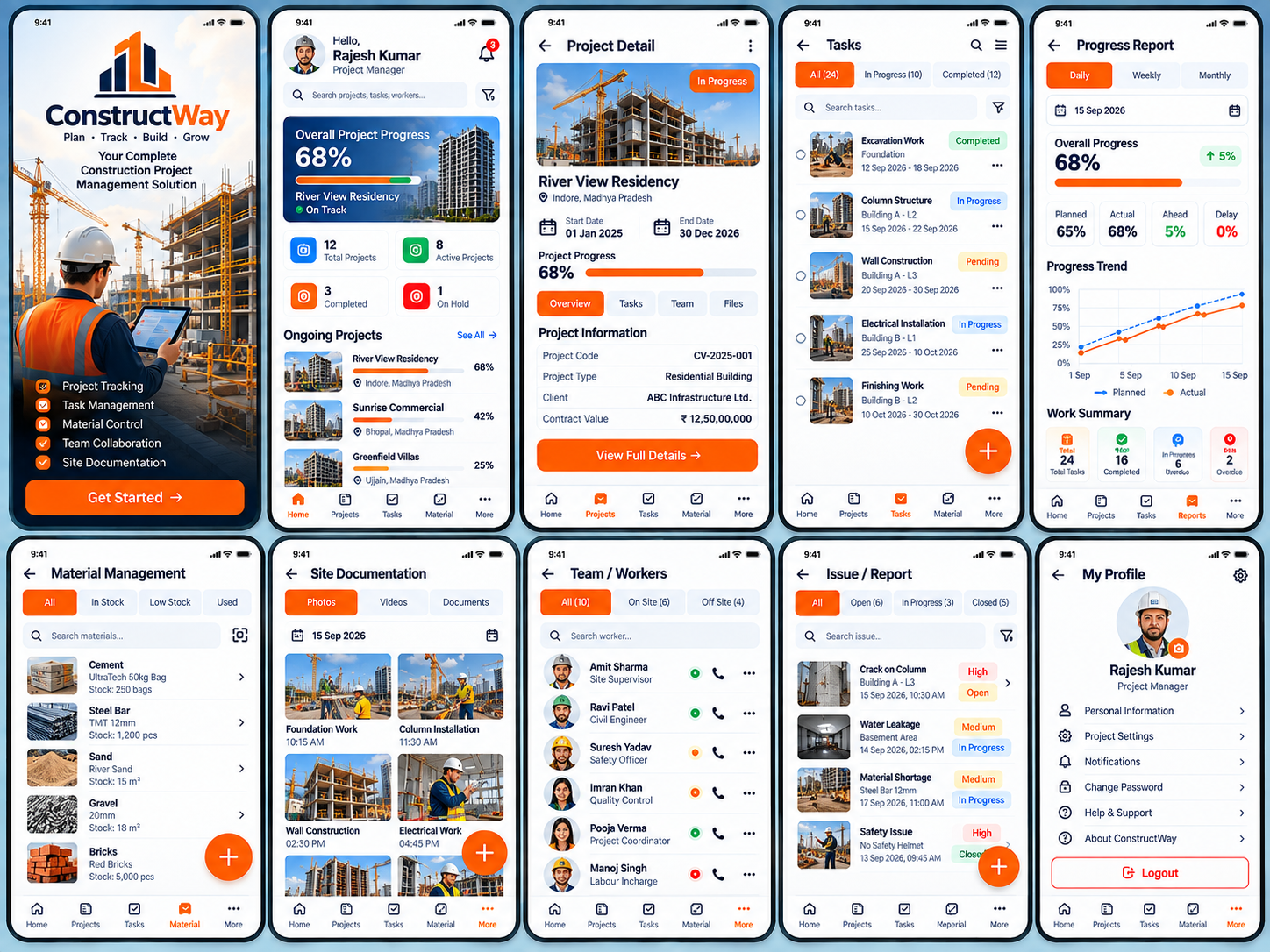
Check out this premium construction project management mobile app concept created for ConstructWay. The interface is designed to demonstrate how a construction business can bring project monitoring, task management, material control, workforce coordination, documentation, and issue reporting into one mobile experience.
Instead of relying on scattered spreadsheets, messages, photographs, paper records, and separate communication channels, a centralized project management application can organize essential project information into clearly defined sections.
The dashboard provides an overview of active projects and progress, while individual project pages provide deeper information about schedules, tasks, teams, files, and project status. Dedicated sections for materials, site documentation, workers, and issues help field teams manage day-to-day construction activities more systematically.
The concept is designed to be adaptable. It can be customized according to the size of the construction company, the type of projects being managed, the number of users, approval workflows, reporting requirements, and the level of project visibility required by management.
📋 Case Study – ConstructWay
Today, we would like to present a construction project management mobile application concept developed for ConstructWay, a demo construction management brand created to demonstrate the capabilities of a modern project management platform.
Client Representative: Mr. Rajesh Kumar
Client / Brand Name: ConstructWay
🎯 The Challenge
The client wanted a centralized mobile experience for managing construction projects and keeping important project information accessible to management and field teams. The application needed to address the practical challenges that occur when project information is spread across multiple tools and communication channels.
The Key Requirements Included:
- A clear overview of all ongoing construction projects.
- Project progress monitoring with planned and actual performance.
- Task creation and task status management.
- Material availability and stock monitoring.
- Worker and team coordination.
- Site photo and document management.
- Issue and problem reporting.
- Project-level information and schedules.
- Progress reports for different time periods.
- Simple navigation suitable for field use.
- A professional dashboard for project managers.
The main objective was to create a mobile experience that could provide project managers with a quick overview while also giving them access to detailed project information whenever required.
💡 The Solution
The SiteSwift design approach created a structured mobile application in which every major construction management activity has a dedicated area. The dashboard provides the overall project view, while project-specific screens allow users to move deeper into tasks, materials, workers, files, and issues.
The application is designed around a simple principle: project managers should be able to understand what is happening on their projects quickly, identify areas requiring attention, and access supporting information without navigating through complicated interfaces.
📱 Application Modules
01. Branded Welcome Screen
The welcome screen introduces the ConstructWay brand and immediately communicates the purpose of the platform. Construction imagery reinforces the industry focus while the primary action guides the user into the application.
- Custom construction-focused branding
- Project management positioning
- Construction imagery
- Clear Get Started action
02. Project Dashboard
The dashboard provides a high-level view of the construction portfolio. Users can quickly understand how many projects are active, completed, or on hold and can see progress across ongoing projects.
- Total projects
- Active projects
- Completed projects
- Projects on hold
- Overall progress
- Ongoing project list
- Project status indicators
03. Project Detail
The project detail screen provides a complete overview of an individual construction project. It combines project information, schedule, progress, and access to related project sections.
- Project image
- Project name
- Location
- Start date
- End date
- Progress percentage
- Project information
- Project code
- Client information
- Contract value
- Overview / Tasks / Team / Files sections
04. Task Management
The task management module allows teams to monitor individual construction activities and their current status. This provides visibility into completed, active, pending, and delayed work.
- All tasks
- In-progress tasks
- Completed tasks
- Task search
- Task dates
- Task status
- Task progress
- Priority indicators
- Add task action
05. Progress Reports
The progress report section converts project activity into a visual management view. Users can review daily, weekly, or monthly performance and compare planned progress with actual progress.
- Daily reports
- Weekly reports
- Monthly reports
- Overall project progress
- Planned percentage
- Actual percentage
- Ahead / delay indicators
- Progress trend chart
- Work summary
06. Material Management
The material management module provides visibility into construction materials available at the site. It can help teams identify stock levels and focus attention on low-stock or used materials.
- Material categories
- In-stock status
- Low-stock status
- Used materials
- Material search
- Material quantity
- Material units
- Material detail view
- Add material action
07. Site Documentation
Construction sites generate a large amount of visual and documentary information. The site documentation module provides a structured space for organizing project photos, videos, and documents.
- Project photos
- Site videos
- Documents
- Date-based records
- Construction activity labels
- Foundation documentation
- Column installation
- Wall construction
- Electrical work
- Upload / add action
08. Team & Workers
The team management section helps project managers maintain a clear view of workers and project personnel. Users can identify roles and availability while having quick access to communication actions.
- Worker list
- Job roles
- On-site workers
- Off-site workers
- Availability indicators
- Contact action
- Worker search
- Team coordination
09. Issue & Report Management
The issue reporting module allows construction teams to record problems that may affect safety, quality, materials, schedule, or project progress.
- All issues
- Open issues
- In-progress issues
- Closed issues
- Issue severity
- Issue status
- Issue location
- Issue date and time
- Issue description
- Add issue action
10. User Profile & Settings
The profile section gives project managers a central location for personal information, project settings, notifications, support, and account controls.
- Personal information
- Project settings
- Notifications
- Password management
- Help & support
- About application
- Logout
🔄 Construction Project Management Workflow
The application is structured around the daily workflow of a construction project. A project manager can begin with a portfolio-level overview and then move into specific project information depending on the requirement.
- Open the ConstructWay application.
- Review the project dashboard and overall project status.
- Select an active construction project.
- Review project schedule, location, progress, and project information.
- Open the task section to review current activities.
- Check completed, active, pending, or overdue tasks.
- Review material availability and identify low-stock requirements.
- Open site documentation to review recent photos, videos, and documents.
- Review the project team and worker availability.
- Check reported construction issues and their current status.
- Review progress reports and compare planned versus actual performance.
- Take required actions, update project information, or add new records.
- Continue monitoring project performance through the dashboard.
🏗️ Why a Construction Project Management App Matters
Construction management involves coordination between office teams and people working directly at project sites. A centralized mobile platform can reduce the gap between project information and field activity by making important records easier to organize and access.
Better Project Visibility
Management can view the status of multiple projects from one dashboard and quickly identify projects that need attention.
Improved Task Control
Tasks can be organized by status, deadline, priority, and project, making it easier to follow daily construction activities.
Material Awareness
Current material information can help teams identify shortages and plan requirements before they affect work.
Stronger Team Coordination
Worker and team information can be organized by role and availability to support better coordination.
Structured Site Documentation
Photos, videos, and documents can be organized around project activities instead of remaining scattered across personal devices.
Faster Issue Visibility
Site problems can be recorded and categorized so management can review open and unresolved issues.
Progress-Based Decision Making
Visual progress reports can help project managers compare planned work with actual progress and identify delays or variations.
Centralized Project Information
Important project information can be brought together in a single digital platform rather than being distributed across multiple sources.
👥 Potential User Roles
The application can be structured with different access levels depending on the organization’s workflow. Each role can be provided with the information and actions relevant to its responsibilities.
Project Manager
Overall project monitoring, task oversight, progress review, team coordination, issue management, and reporting.
Site Supervisor
Daily site activity, task updates, material status, documentation, and issue reporting.
Civil Engineer
Project tasks, construction progress, site documentation, technical activities, and issue information.
Safety Officer
Safety-related observations, incidents, inspections, issue reporting, and follow-up activities.
Quality Control Team
Quality observations, documentation, construction issues, and corrective actions.
Material / Store Team
Material stock, availability, usage, shortages, and material records.
Project Coordinator
Project documentation, schedules, communication, and general coordination.
Management / Admin
Portfolio overview, progress reporting, project status, performance monitoring, and administrative controls.
🎨 UI/UX Design Approach
The reference design uses a professional construction-focused visual language. The interface combines strong construction imagery with a clean dashboard structure so that complex project information remains easy to understand.
- Construction-focused visual identity
- Professional blue and orange interface accents
- Large project progress cards
- Clear status labels for tasks and issues
- Visual progress bars and charts
- Compact information cards
- Search and filtering controls
- Image-based project and site documentation
- Simple bottom navigation
- Clear primary action buttons
- Readable project metrics
- Mobile-first field usability
- Consistent status indicators across modules
The interface is designed for professionals who may use the application while moving between office and site environments. Therefore, important information is presented visually and actions are kept direct and easy to identify.
🚀 Why Choose SiteSwift for Your Construction Management App?
At SiteSwift, we focus on understanding the business workflow before designing the digital product. A construction management application needs to reflect how projects are actually planned, executed, monitored, documented, and reviewed.
Industry-Focused Product Structure
We can organize the application around real construction activities such as project progress, tasks, materials, workers, documentation, and issue reporting.
Custom UI/UX
The interface can be designed around your company branding, project workflow, user roles, reporting requirements, and the information your teams actually need.
Clear Project Visibility
We focus on dashboards and information structures that make project status easier to understand without overwhelming users.
Field-Friendly Experience
Construction teams often work in demanding environments, so the interface can be planned around quick access, clear labels, large actions, and straightforward workflows.
Scalable Business Structure
The application can begin with core project management features and expand later as the company’s operational requirements grow.
Complete Product Planning
From requirement gathering and user-flow planning to UI/UX, development, testing, deployment, and future improvements, SiteSwift can support the complete digital product journey.
Business-Centered Approach
The objective is not simply to create attractive screens, but to build a useful digital platform that supports construction operations and project visibility.
Your Construction Projects Deserve a Smarter Digital Workflow.
Plan → Track → Coordinate → Document → Report → Improve
🔮 Future Expansion Possibilities
The initial construction project management application can be expanded into a broader digital ecosystem as the company grows and its operational requirements become more advanced.
- Project approval workflows
- Daily site reports
- Attendance management
- Worker attendance and timesheets
- Equipment and machinery tracking
- Material purchase requests
- Supplier management
- Purchase order management
- Subcontractor management
- Budget and cost tracking
- Invoice and payment records
- Safety inspection checklists
- Quality inspection workflows
- Drawing and plan management
- Document approval workflows
- Client progress updates
- Project milestone management
- Deadline reminders
- Escalation alerts
- Advanced project analytics
- Management reports
- Multiple company / branch management
- Role-based access control
- Client portal
- Vendor portal
📈 Project Outcome
The ConstructWay concept provides a structured digital foundation for managing construction projects through a single mobile experience. It connects project overview, progress, tasks, materials, workers, documentation, and issues into a logical workflow.
- Centralized project visibility
- Better task organization
- Improved material awareness
- Structured workforce coordination
- Organized site documentation
- Faster issue identification
- Clear progress reporting
- Better communication between project roles
- A professional digital project management experience
- A scalable foundation for future construction management features
The result is a modern construction management product concept that can be adapted for residential projects, commercial buildings, infrastructure projects, industrial construction, institutional projects, warehouses, and other large-scale construction operations.
🏢 Who Can Benefit From a Platform Like This?
- Construction Companies
- Builders & Developers
- General Contractors
- Civil Engineering Companies
- Infrastructure Companies
- Real Estate Development Companies
- Industrial Construction Firms
- Commercial Construction Companies
- Project Management Companies
- Site Management Teams
- Facility & Infrastructure Contractors
- Construction Consultants
🏗️ Ready to Build Your Construction Project Management App?
Your construction projects involve people, materials, schedules, tasks, documents, and continuous on-site decision-making. A dedicated mobile application can bring these activities into one structured digital environment.
Whether you manage residential construction, commercial buildings, infrastructure projects, industrial sites, or multiple construction projects at the same time, SiteSwift can help you design a professional mobile platform tailored to your actual project management workflow.
We can transform your idea into a complete digital product concept covering project dashboards, task management, material control, worker coordination, site documentation, issue reporting, progress reports, and future business modules.
📩 Share your construction management requirements with SiteSwift and let’s build a smarter digital workflow for your projects.
Plan Your Projects → Track Progress → Manage Tasks → Coordinate Teams → Control Materials → Document Sites → Resolve Issues
📌 Project Information
Project Title: ConstructWay – Construction Project Management Mobile App
Project Type: Construction Project Management Mobile Application
Demo: ConstructWay
Client Representative: Mr. Rajesh Kumar
Industry: Construction & Project Management
Primary Purpose: Project Monitoring, Task Management, Material Control, Workforce Coordination, Documentation & Issue Reporting
Core Modules: Dashboard • Projects • Tasks • Progress Reports • Materials • Site Documentation • Team / Workers • Issues • Profile
Key Features: Project Progress • Task Tracking • Material Management • Worker Coordination • Site Documentation • Issue Reporting • Progress Analytics
Target Users: Project Managers • Site Supervisors • Engineers • Safety Officers • Quality Teams • Material Teams • Management
Platform: Mobile Application
Design Approach: Professional • Construction-Focused • Dashboard-Driven • Field-Friendly • Mobile-First
Development Partner: SiteSwift
⚠️ UI/UX Design Concept for Reference
The presented screens demonstrate the intended product experience and information architecture. A production-ready application would require finalized business requirements, user roles, workflows, data structure, integrations, security requirements, testing, deployment, and other implementation details based on the final project scope.
SiteSwift | Digital Product Design & Development